AI-assisted crypto trading dashboard
RGPT
A private trading dashboard and bot for Robinhood Crypto. Run one or many symbols, each with its own strategy, timeframe, and trade sizing, with live charts, AI-assisted trade review, backtesting, runtime controls, and practical risk guardrails.
- Docker install
- Multi-symbol support
- 20+ strategies
- AI-assisted review
- Backtesting engine
- Robinhood Crypto API
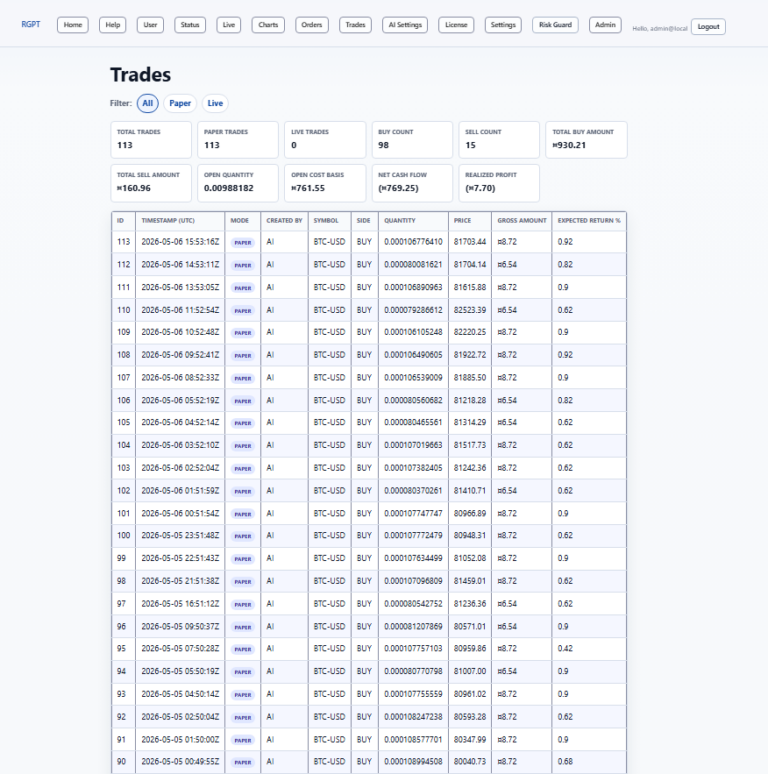
Operate with visibility
Keep the bot, market, and account state in one place.
RGPT gives traders a focused control surface for price monitoring, bot pause and resume, cycle timing, buy and sell caps, live trading state, orders, trades, charts, status, and AI settings. Each running symbol keeps its own position, decisions, and status snapshot, while risk guards stay shared.
Core workflow
Built for hands-on crypto automation.
RGPT is designed for users who want direct control over credentials, model settings, runtime behavior, strategies, and trading mode before allowing any live order flow.
AI-assisted decisions
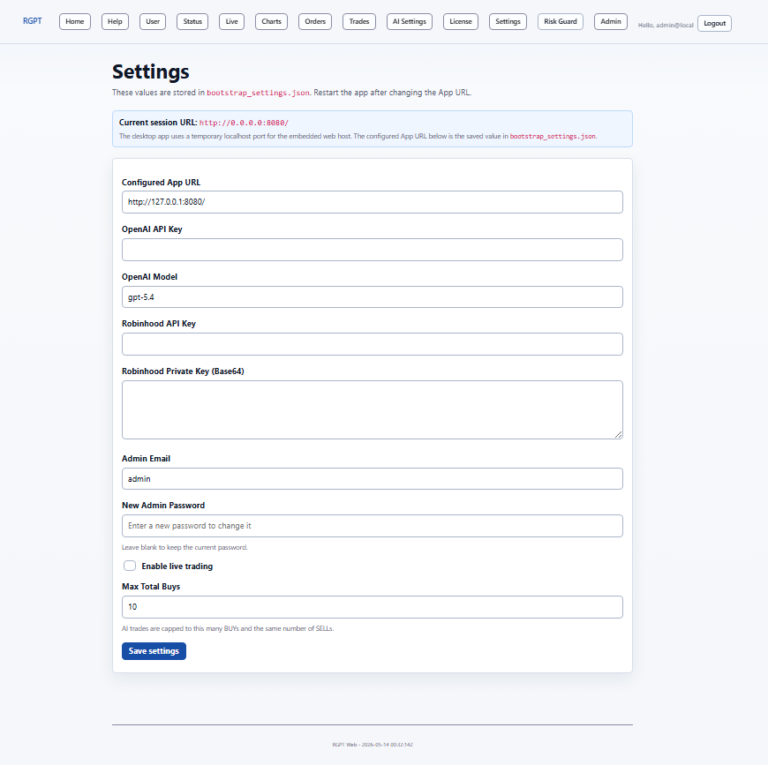
Configure the OpenAI API key and model used by the trading engine for AI-supported trade review.
Multi-symbol portfolio
One instance runs many symbols, each with its own strategy, timeframe, trade sizing, cycle interval, pause state, and live-trading state.
Strategy catalog
Choose from 20+ built-in strategies - trend, momentum, RSI, VWAP, Fibonacci retracement, grid, and portfolio-style approaches.
Backtesting engine
Simulate any strategy over historical bars with chart markers, equity curve, fees, drawdown, and buy-and-hold comparison.
Risk guardrails
Keep live trading disabled during setup, then control buy and sell caps, runtime pause state, and protective order behavior.
Admin setup
First-run setup creates the application URL, admin login, license state, and API credential configuration.
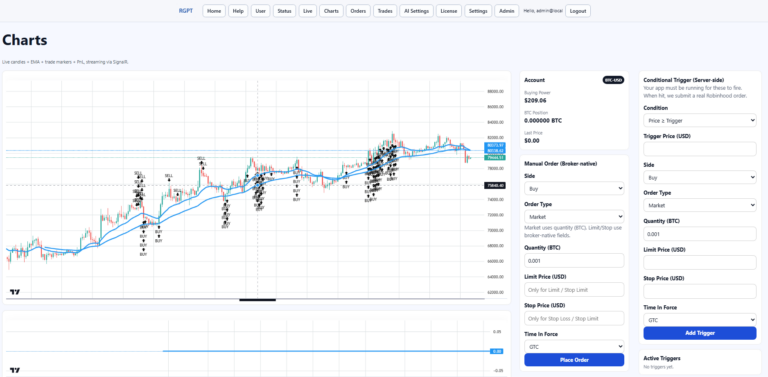
Live charts
Review market movement and dashboard views from the same web app used to manage the bot.
Order tracking
Inspect orders, trades, conditional orders, event logs, and bot status without digging through raw logs for normal operation.
Docker deployment
Run the published RGPT web image with Docker Compose and persistent app data in a Docker volume.
Install path
From container to configured dashboard.
Start RGPT
Use Docker Compose to run the published RGPT image and expose the web UI on port 8080.
Complete setup
Open the first-run setup page and enter the app URL, OpenAI key, Robinhood Crypto credentials, and admin login.
Activate license
A 30-day trial starts automatically. Buy from the store and activate the emailed claim code from the License page.
Review controls
Confirm cycle timing, pause state, live trading mode, symbols, limits, charts, orders, and risk settings before trading.
Docker deployment
Run RGPT locally with Docker Compose.
RGPT ships as a web application container. Docker keeps the app, SQLite identity database, runtime settings, AI settings, bot settings, and trading data together while exposing the dashboard at http://localhost:8080.
Docker Compose file
Create or use the included docker-compose.yml file:
services:
  rgpt-web:
    image: ghcr.io/stoxello/rgpt:latest
    container_name: rgpt-web
    restart: unless-stopped
    ports:
      - "8080:8080"
    environment:
      ASPNETCORE_URLS: http://+:8080
      APP_URL: http://0.0.0.0:8080/
      RGPT_DATA_DIR: /app/data
      RGPT_BOOTSTRAP_SETTINGS_PATH: /app/data/bootstrap_settings.json
      ConnectionStrings__Identity: Data Source=/app/data/rgpt_identity.db
      LIVE_TRADE: "false"
    volumes:
      - rgpt-data:/app/data

volumes:
  rgpt-data:
Start and verify
From the folder containing the compose file, start RGPT and check the container:
docker compose up -d
docker compose ps
If startup fails, inspect recent logs:
docker compose logs --tail 100 rgpt-web
First-run setup
- Open http://localhost:8080/Setup.
- Use http://localhost:8080/ as the configured app URL.
- Enter your OpenAI API key and model.
- Enter Robinhood Crypto API credentials if you plan to connect live trading.
- Create the first admin email and password.
- Leave live trading disabled until you have reviewed keys, limits, and risk settings.
After saving setup, restart the container:
docker compose restart rgpt-web
Requirements
- Docker Desktop or Docker Engine with Docker Compose.
- Internet access so Docker can pull the RGPT image.
- An OpenAI API key for AI-assisted trade review.
- Robinhood Crypto API key and base64 private key for live trading.
- An RGPT license key after the included 30-day trial ends.
30-day trial and store license
The 30-day trial starts automatically the first time RGPT initializes its data. No key is required during the trial.
To continue after the trial, buy RGPT in the store. After checkout you receive a claim code by email, then:
- Open http://localhost:8080/License.
- Paste the claim code.
- Click Activate.
The License page shows the current license mode, product, plan, expiration date, days remaining, and machine ID.
Licensing
Try it free for 30 days, then license from the store.
Every RGPT install includes a 30-day trial that starts automatically - no key required. When you are ready, buy a license in the store. After checkout, a claim code is emailed to you. Paste that claim code into the License page in RGPT and click Activate to keep trading.
Start the trial
Install RGPT and sign in. The 30-day trial begins automatically on first run. No key is needed during the trial.
Buy in the store
Choose a Pro 1-year or Lifetime license for RGPT and complete checkout in the store.
Receive the claim code
Your claim code is sent by email after the purchase is completed.
Activate in RGPT
Open http://localhost:8080/License, paste the claim code, and click Activate. Your plan and expiration appear immediately.
RGPT licenses
- Pro 1-year - includes 365 days of trading from activation.
- Lifetime - one-time purchase, never expires.
The License page shows your current license mode, product, plan, expiration date, days remaining, and machine ID at any time.
Buy RGPT now
Open the store to see the current plans and prices for RGPT:
Questions? Use the contact form on the store site before purchasing.
Screens
A practical dashboard, not a black box.
Ready to set up RGPT?
Start with the 30-day trial, confirm credentials and limits, then enable live trading only when you are ready for real Robinhood Crypto orders.
Risk notice: RGPT is provided for educational and research purposes. Cryptocurrency trading involves risk, including possible loss of capital. You are responsible for your trading decisions, API credentials, account permissions, and financial outcomes.